Anti-Procrastination Workflow

The idea is simple, use Jira for long term tasks management. This can be done effectively using different issue types and further nested nature of such tasks. I plan to use Jira for both my work related and normal day-to-day life related task as well. Simply put, “Jira for long-term task planning”.
Then, use Super Productivity as task execution space. It has integration to Jira which makes it really easy to fetch stuff which I need to take care now. Basically classify tasks as ‘today’ in Jira and then pull them to ‘now’ in Super Productivity.
Finally, without a proper metric any tracking system is fail and this is the main motivation behind this multistep workflow (some might even say unnecessary, which TBH time will only tell 🙃). Idea is simple, I want the power/freedom to create psychologically proven helpful custom metrics which I can use to give myself micro dopamine hits to trick my brain towards craving meaningful work. This is to be done using a Astro.js webapp and Cloudflare functions.
Task Aversion
The main reason for procrastination boils down to the feeling: Task Aversion. Two prominent reasons for these are1:
- Low self-efficacy: You’re unsure what to do.
- Delay: Rewards are so far in future that your brain discounts them.
In my opinion, solution for (2) is either imagine the severe consequences you’d face if you fail to do the task. Or, just romanticize the reward so much that you crave for it. This will either trigger your panic monster2, or will give you enough self-motivation that you’ll at-least pick up the task.
A better way of doing so is MCII (mental contrasting + implementational intent)3 which is to vividly want the outcome and confront obstacles, then plan around it. Each work session can be started with WOOP, for example:
- Wish: “Submit LaTeX report on HW1”
- Outcome: “I feel relieved/ mental clarity to work on research”
- Obstacle: “Might endup going in Neovim LaTeX workspace setup rabbit hole”
- Plan (If-then): “If I feel urge to wander, I’ll write the urge in ‘parking lot’ note and do 5 minutes of next action of main task.”
Plan is very important cause it gives you concrete actions to do when that urge hits.
But then you run into (1), the task seems too big and uncertainty makes you think, ‘Hmm, maybe now it’s not the right time to start, I should get a coffee first!’ (or create a complete multistep project to mange procrastination 🙂).
Procrastination is often an emotional regulation strategy gone wrong. You avoid tasks to feel better now (less anxiety, less boredom, less shame), even if if makes future you miserable. Being self-aware about it when it’s happening and labeling it often help you to realize what’s the cause for your aversion. So while creating each task, have 10 seconds ‘state check’ by evaluating:
- Aversion (1-5)
- Clarity (1-5)
This will quantify your emotion + uncertainty, which will help you see through your feelings.
Planning Fallacy
Progress is incremental, i.e., you figure out what you need to do while you are working on it, and rarely know exact steps beforehand. The PDCA (Plan - Do - Check/Study - Act)4 model gives you a good perspective on what progress really means.
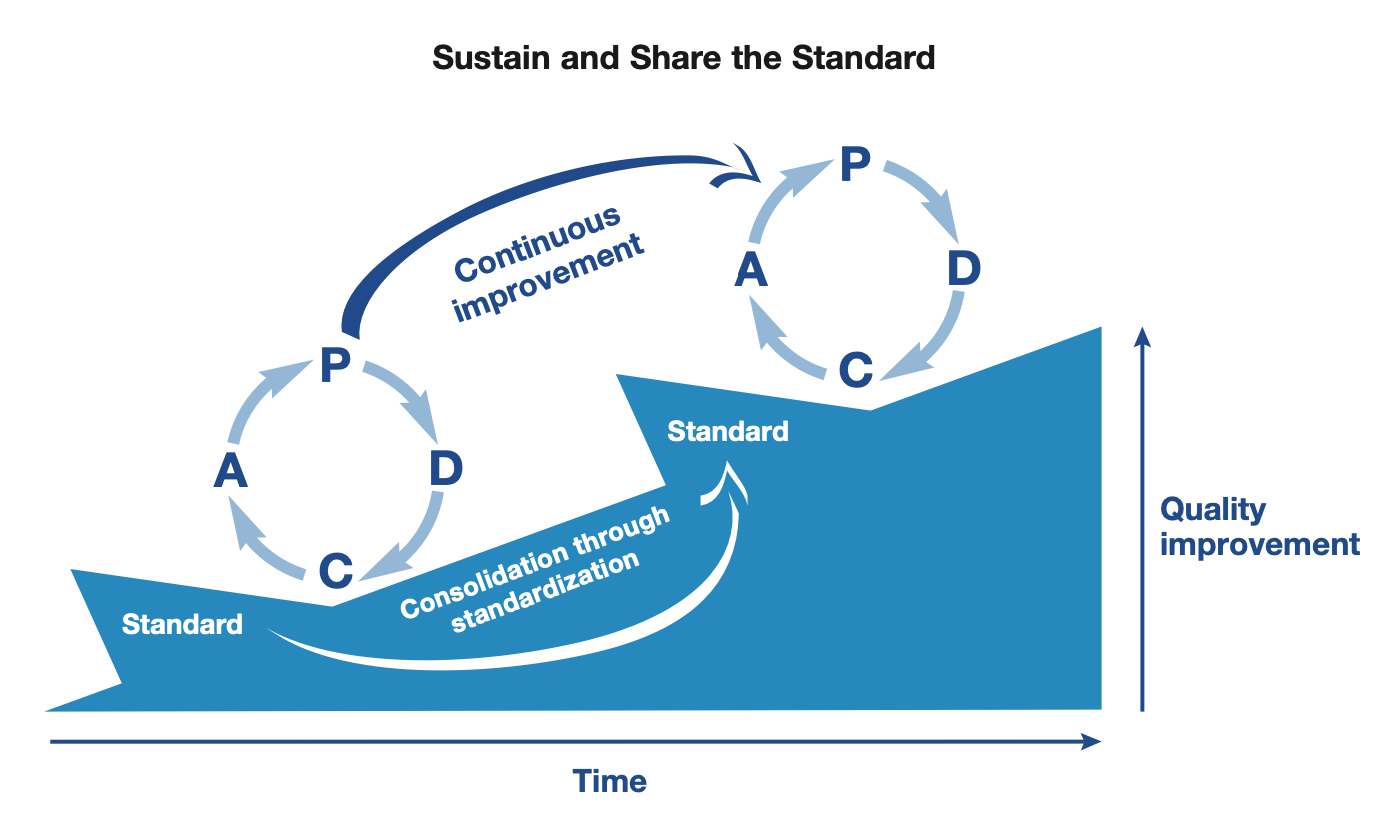
Counting progress just as tasks completed will limit or borderline punish the exploration — which is a big part of learning and research; thus hours worked on something seems to be a good metric. But, there’s a thin line between exploring and wandering off. So for this I think, time boxed work session with a clear direction with the ending progress consolidation round. The analysis at the end of the session is the most important part about it, this prevents the drift from the actual objective. It’s possible that the objective shifts after the session, but it’s fine as you are getting more clarity out of it and the introspection part at the end of session keep you accountable to not drift off into doing something unrelated.
I need to create a set of metrics which are:
- (Productivity) truthfully accounts for the productive time per session
- Super Productivity captures the time spent (capture per app time using Qbserve). I’ll write an automation to link these attributes to sessions
- Other one is self-perceived productivity, it’s an important measure of this which forces you to correct and steer yourself towards right direction.
- This will also be useful to find productive patches of time which can be analyzed for finding behavioral patterns.
- (Consistency) to gamify process rather than having reward on completions
- Started on time or before time
- Did the 2-mins of next action
- Not consolidated session counts (negative metric)
- (Drift) measures the drift from initial direction
- Drift tells us how our objective or perspective on the task has evolve or have we digressed from the original task. Types could be:
- Productive pivot (I learned something and the plan should change) good-type
- Necessary detour (Hit the wall and had to unblock, ask help) often necessary type
- Avoidant drift (My brain ran away to feel better / chase novelty) bad type
- Drift tells us how our objective or perspective on the task has evolve or have we digressed from the original task. Types could be:
- (Progress) to track how far we have come rather than how close to the end are we. It’s difficult to truthfully judge the extent of task so it’s not correct to put metric on how much of the work is remaining, but we can still count how far have we come. This is to be done using:
- Total work session time spend.
- Number of subtask created. I explicitly want to avoid having sub-tasks/tasks completed as a metric as often a single task is spanned over and is evolving over multiple work sessions, so it’s a rather untruthful measure.
I’d like to treat subtasks as work-done logs rather than future work items. That means, subtasks lives as action items in the work session. I want them to be atomic units of work, where the requirements and output is deterministic and it doesn’t take any cognitive load to start working on them. Inside a work session treat them as a TODO list where you just put it as an action. Ideally you should try to finish as much of these action items possible in a work session, but in an exploratory session you might have a lot of new work items which either can be made into sub-task or need more clarity. The sense-making/consolidation part of the session should be utilized to categorize them and select direction for next work session. In fact this will help in measuring the drift.
How to tackle task aversion?
- Have a “why it matters?” when putting task in Jira.
- Have deadlines/milestones you want to achieve out of the task.
- Where to start? For this task
- Perceived time estimates and earliest start for this task.
Tackling choice paralysis: Certainly you are gonna have more task you can manage in your Jira and this is gonna make you feel overwhelmed and trigger your procrastination. This will make you endup standing at the deadline, working 12 hours a day and being suboptimal with work. The aim of this system is stop this from happening and give clarity and make things approachable, by
- Having separate Space/Projects in Jira for different areas like “PhD Applications”, “Research & Coursework”, “Health/Chores/Food” rather than having all of them as Epics in same project to reduce mental clutter.
- The system has to be setup up like a max-heap where you always know what to do next and how to push a new work item into the system. So you don’t get overwhelmed over choices.
Workflow
The aim of the workflow is to be extendable, which I can develop as I keep using it. For now it uses Jira for work management database, Super Productivity and Qbserve for work session tracking, more specifically as an execution space. Super producutivity alreay has integration with Jira. Finally I’ll use my astro.js + Cloudflare functions to create custom dashboard.
Jira
I’m using Jira as a database of all my work, so that I don’t need to keep track of it all mentally. For better segregation I’m creating multiple projects.
For now I’ll create 3 projects in Jira:
- PhD Applications
- Research & Coursework
- Health, Food & Chores
Issue Type hierarchy: Epic > Task > Subtask.
Epic
A class of task, like ‘reading assignment’ or ‘vortex simulation implementation’
Task
Each work session will deal with a task. This is specific action item inside an epic. For example, ‘Reading Paper Selection’, ‘Fix Advection Step’. The attributes a task has:
- Context: 1-2 sentence summary of what are we going to do.
- Why it matters? 1 sentence on what you achieve through doing this task. What are the milestones it’ll help you to achieve?
- Aversion (1-5): To quantify how much aversion you feel to start with the task
- Clarity (1-5): How much clarify you have, can you list down all the action items? And how confident are you that the task will be done if you finish those?
- Estimated Time: Intrinsic time estimate you think that this task will take. It’s OK if the task takes more than expected, this one will help you to calibrate your time expectation realistically as you keep using the system.
- Deadline: Deadline by which I need to finish it.
- Estimated completion time: Your guess on how much time it’ll take.
- Tags: This will be used to mark the tasks that you want to do today (you can even set these night before the day). Based on this, tasks will get pulled to Super Productivity which then you can tackle in work sessions.
- Session History: It’s the history of all the work sessions which worked on this task.
Subtasks
- This is something new.
Work Sessions
Before Start
- WOOP
- Wish: “Submit LaTeX report on HW1”
- Outcome: “I feel relieved/ mental clarity to work on research”
- Obstacle: “Might endup going in Neovim LaTeX workspace setup rabbit hole”
- Plan (If-then): “If I feel urge to wander, I’ll write the urge in ‘parking lot’ note and do 5 minutes of next action of main task.”
- Definition of Done for session
- Action Items
End of Session
- Wrapup
- Did I achieve the goal of session?
- What went good? And what could be improved?
- Open questions?
- Next Steps.
- Subtask completed
- Remaining Action items
- Write next steps for each one.
- If somethings went wrong then do an AAR (Action After Review)
- What was supposed to happen? (your target artifact)
- What actually happened? (facts: what you produced)
- Why were they different? (1–2 causes, no guilt trip)
- What will I do next time? (one change to process)